

Updated: 23 July 2026 | Author: Editorial Team Author Profile
Spotify Local Files usually stop syncing because the files are stored in an unsupported format, local file permissions are blocked, the devices are not connected to the same network, or Spotify’s local file settings are not configured correctly. To fix Spotify Local Files not syncing in 2026, enable Local Files on every device, verify the music folder location, use supported audio formats such as MP3 or M4P without unsupported protection, and ensure your desktop and mobile devices meet Spotify’s sync requirements. This guide covers the most reliable fixes for missing local tracks, failed downloads, and playback issues across Android, iPhone, and desktop.

Table of Contents
- 1. Why Spotify Local Files Fail to Sync ?
- 2. Basic Fixes for Local music won't sync to Spotify
- 3. Advanced Fix — Manual File Sync via App Folder
- 4. Platform-Specific Fixes (Windows, Android, iOS)
- 5. 2026 Update: Spotify’s New Sync Protocol
- 6. Final Checklist Before You Reinstall
- 7. Listen to the World's Trending Music
- 8. Conclusion: The Real Fix for Spotify Local Files Not Syncing in 2026
Why Spotify Local Files Fail to Sync ?
Ever spent hours curating the perfect playlist, only to realize your Spotify local files not syncing between desktop and mobile? You’re not alone. Thousands of users face this frustrating issue every month, whether they’re trying to enjoy downloaded tracks offline or sync rare MP3 files from their computer to their phone.
But here’s the truth: Spotify’s local file syncing system changed significantly in 2026 with new security layers, caching rules, and connection protocols. Understanding why your local songs don’t appear on your other devices is the first step toward fixing it permanently.
Common Causes for Spotify local music not synchronizing
Different Wi-Fi networks between devices
Disabled “Local Files” toggle in Spotify settings
Firewall or antivirus blocking Spotify’s ports
Corrupted Spotify cache or outdated app versions
iOS background data restrictions
Changes in Spotify’s new Local File Sync Protocol (2026)
If any of these sound familiar, don’t worry, the fixes for Spotify Local Files Fail to Sync are simple and verified by Spotify’s latest documentation and user reports.
Basic Fixes for Local music won't sync to Spotify
Before jumping into advanced troubleshooting, try these proven basic fixes. Most users solve the issue within minutes using these.
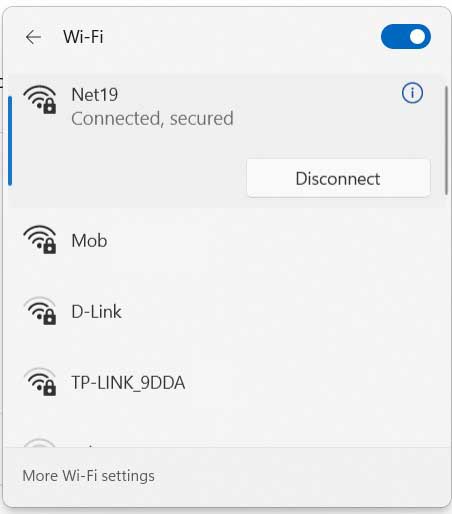
1. Check Same Wi-Fi Network
Spotify syncs local files only when both devices share the same Wi-Fi network.
✅ Make sure:
Your phone and desktop are connected to the exact same network SSID.
VPNs or mobile hotspots are disabled, as they block Spotify’s internal sync ports.
If you’re using a dual-band router, connect both devices to the 2.4 GHz or 5 GHz band, not one on each.
2. Enable Local Files in Settings
Spotify doesn’t sync local music unless this toggle is turned on.
Desktop:
Open Spotify → Settings → Local Files
Enable “Show Local Files”
Add your music folders (e.g., Downloads, Music, Custom Folder)
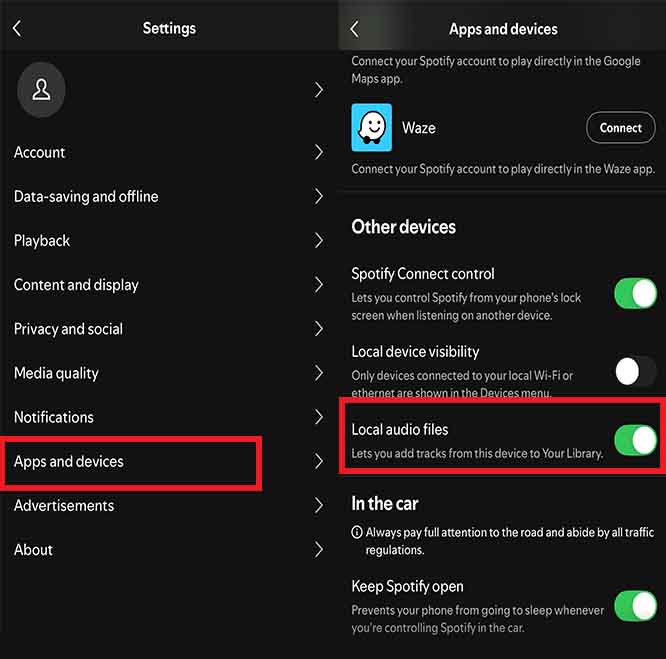
Mobile (iOS/Android):
Open Settings → Apps and Decive
Turn on “Show audio files from this device”
Restart both apps and open your local playlist again.
3. Allow Spotify Through Firewall
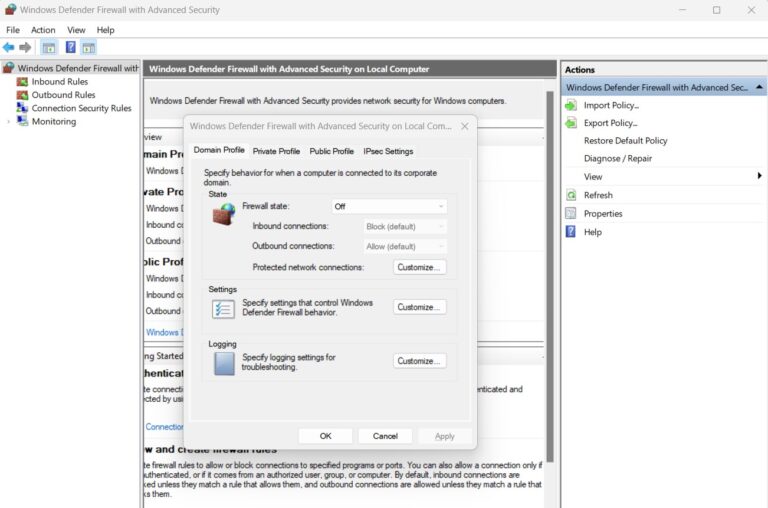
Firewalls and antivirus software can silently block Spotify’s sync traffic.
Windows:
Open Windows Defender Firewall → Allow an app through Firewall
Ensure both Spotify.exe and Spotify Web Helper are allowed for Private Networks
Mac:
Go to System Settings → Network → Firewall Options
Add Spotify as an allowed app
Restart Spotify and check if your local songs appear on mobile.
Advanced Fix — Manual File Sync via App Folder
When normal syncing for Spotify Local Files Not Syncing fails, use the manual sync method. This technique works across Windows, macOS, Android, and iOS.
Locate your Spotify storage directory:
Windows:
C:\Users\[YourName]\AppData\Roaming\Spotify\Users\[Account]\macOS:
/Users/[YourName]/Library/Application Support/Spotify/Users/[Account]/
Find the “Local-Files” folder.
Copy it to your mobile device manually using a USB cable or cloud storage.
Restart Spotify on both devices — it will automatically scan and match the local file hashes.
This process ensures Spotify recognizes the exact same files across devices, bypassing any network sync issue.
Platform-Specific Fixes (Windows, Android, iOS)
| Platform | Common Cause | Verified Fix |
|---|---|---|
| Windows | Firewall or corrupted cache | Clear cache folder & re-allow Spotify.exe |
| Android | Battery optimization blocking background sync | Disable battery saver for Spotify |
| iOS | Background App Refresh turned off | Enable Background App Refresh in Settings |
← Scroll →
Pro Tip: Always update Spotify to the latest version 2026 builds include the new Smart Sync service that relies on updated port 57621 for LAN connections.

2026 Update: Spotify’s New Sync Protocol
In early 2026, Spotify quietly rolled out a Local File Sync Protocol v2, introducing:
End-to-end encryption for LAN sync
IPv6 compatibility
Reduced cache duplication
Device-pairing authentication
These changes improved privacy but also broke compatibility with older app builds.
If your desktop uses an outdated version (pre-2025), syncing will silently fail. Update both devices to Spotify v8.9 or later, and re-add your local folders.
Final Checklist Before You Reinstall
Before reinstalling Spotify, confirm each step below:
- ✅ Both devices share the same Wi-Fi network
- ✅ “Show Local Files” is turned on in Settings
- ✅ Spotify is allowed through your firewall
- ✅ You’ve updated Spotify on all devices
- ✅ You cleared cache folders
- ✅ You restarted both apps after syncing
If you’ve verified all and still face issues, a clean reinstall might be required , remove Spotify completely, including cached data, then reinstall the latest build. After setup, re-add your music folders and wait a few minutes for Spotify’s sync engine to re-index files.

Conclusion: The Real Fix for Spotify Local Files Not Syncing in 2026
When your Spotify local files not syncing drives you crazy, don’t panic, 90% of cases are solved by the Wi-Fi + Settings + Firewall trio. For the rest, Spotify’s 2026 Local File Sync Protocol demands updated versions and clean cache handling.
Follow the steps above carefully and you’ll enjoy seamless local file playback across devices whether you’re on Windows, Android, or iPhone.
👉 For deeper technical details, visit Spotify’s official support documentation for local file troubleshooting.
Spotify local files not syncing Spotify local files not syncing Spotify local files not syncing Spotify local files not syncing Spotify local files not syncing
5/5 - (9 votes)


Leave A Reply