

Updated: 29 July 2026 | Author: Editorial Team Author Profile
BlackPlayer and Poweramp are two of the most feature-rich offline music players for Android, but they target different types of listeners. BlackPlayer focuses on a clean interface and simplicity, while Poweramp offers advanced audio controls, a powerful equalizer, and broad audio format support.
This comparison breaks down sound quality, EQ features, library management, customization, battery usage, pricing, and overall performance in 2026, helping you choose the player that best matches your listening style.
Learn more about BlackPlayer Music Player and discover its features, settings, and latest guides.
Explore BlackPlayer Music Player| Feature | BlackPlayer | Poweramp |
|---|---|---|
| Platform | Android | Android |
| Music Type | Offline local music player | Offline local music player |
| Audio Formats | Supports common formats including MP3, FLAC, OGG | Wide format support including FLAC, ALAC, WAV, DSD |
| Equalizer | Built-in EQ with bass boost and sound effects | Advanced EQ with parametric options and many controls |
| Customization | High UI customization and themes | Deep audio and interface customization |
| Interface | Simple and minimalist design | Feature-rich professional interface |
| Best For | Users wanting simplicity and clean design | Audiophiles needing advanced sound control |
| Battery Usage | Generally lightweight | Optimized but offers more processing features |
| Pricing | Free version + paid upgrade options | Paid app with trial version available |
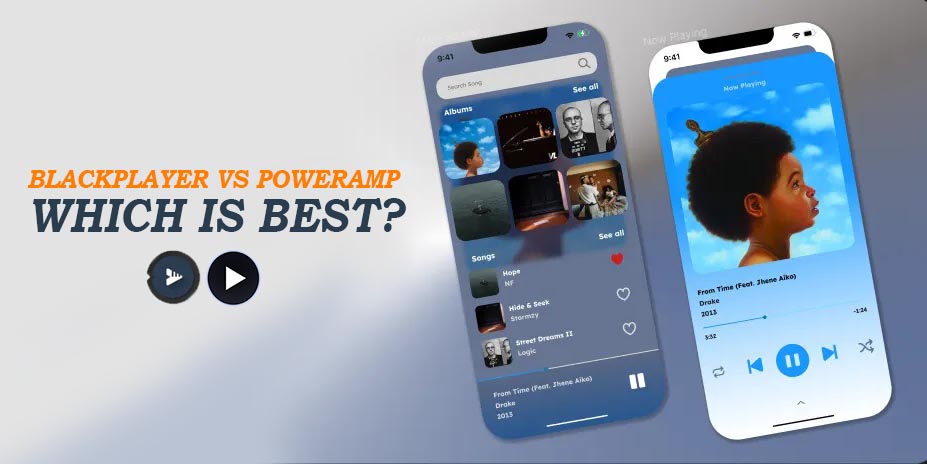
- BlackPlayer is the better choice if you want a clean, lightweight music player with simple customization and an easy-to-use interface. It’s ideal for everyday offline listening.
- Poweramp is the better choice if you need advanced audio controls, extensive EQ options, and broader audio format support. It’s designed for users who prioritize sound customization over simplicity.
Table of Contents
- 1. A quick look at each app : BlackPlayer vs Poweramp
- 2. Feature matrix , at a glance BlackPlayer vs Poweramp 📊
- 2.1. In-depth comparison , by user need
- 2.2. More articles you may find useful
- 2.3. BlackPlayer Failed to Load Track Error in 2026 | How to Fix?
- 2.4. How to Fix BlackPlayer Not Detecting Music Full Guide (2026)
- 2.5. How to Show Lyrics in BlackPlayer Complete Guide 2026
- 2.6. Strengths of BlackPlayer | why promote it?
- 2.7. Strengths of Poweramp — for whom it’s ideal?
- 2.8. Final Recommendation
A quick look at each app : BlackPlayer vs Poweramp
🎧 BlackPlayer (Free & EX)
BlackPlayer is a local-only music player built around a sleek, minimal Material design and fluid navigation. It supports MP3, WAV, OGG, FLAC, and M4A out of the box, with gapless playback and basic 5-band EQ, BassBoost, and Virtualizer. A free version includes ads and limited themes; the EX unlocker ($3.29) removes ads, adds six fonts, eleven color accents, eight extra “Now Playing” themes, customizable widgets, and advanced tagging tools. Library scanning is typically instant, and your most-played tracks appear on a smart “Play Now” home screen.
🚀 Poweramp (Trial & Unlock)
Poweramp is the veteran Android audiophile’s dream, boasting an internal 64-bit audio engine, Direct Volume Control, and support for high-res output up to 384 kHz. It handles MP3, ALAC, FLAC, WAV, APE, WMA, DSD (DSF/DFF), Opus, and more. Its standout feature set includes a 10-band graphical and parametric EQ, customizable presets, AutoEQ import, crossfade, gapless smoothing, ReplayGain, and system-wide Themes engine. The 15-day trial unlocks every feature; the full unlocker costs $3.99. With Android Auto and Chromecast integration, Poweramp remains one of the most polished, feature-packed players available.
Feature matrix , at a glance BlackPlayer vs Poweramp 📊
| Feature | BlackPlayer | Poweramp |
|---|---|---|
| UI | Minimal Material; swipe nav; widgets | Highly customizable skins; multiple layouts; lock-screen controls |
| Equalizer | 5-band graphic; BassBoost; Virtualizer | 10-band graphic; parametric; AutoEQ; DVC; custom presets |
| Hi-Res Audio | 24-bit FLAC & WAV | Up to 384 kHz; DSD; ALAC; system-wide DSP |
| Battery Usage | Lightweight; optimized scanning | Higher CPU use under heavy DSP; wake-lock options |
| Install Size | ~8 MB (Free); ~12 MB (EX) | ~20 MB (trial); ~20 MB (unlocker) |
| Price | Free + $3.29 EX unlock | Free 15-day trial; $3.99 unlock |
| Themes/Skins | 15+ color accents; 2 widget themes | Built-in light/dark; 3+ third-party skin packs |
| Format Support | MP3; WAV; OGG; FLAC; M4A | MP3; WAV; FLAC; APE; WMA; Opus; DSD; ALAC; more |
| Special Features | Gapless; tag editor; lyrics edit | Crossfade; ReplayGain; visualizer; CUE support; Chromecast; AutoEQ |
← Scroll →
UI: BlackPlayer’s interface focuses on swipe gestures and minimal controls to keep distractions low, whereas Poweramp offers granular UI adjustments—menu positions, artwork zoom, button sets—to satisfy every layout preference.
Equalizer: BlackPlayer provides a straightforward 5-band graphic EQ plus bass and virtualizer tweaks. Poweramp’s 10-band and parametric EQ, Direct Volume Control, and importable AutoEQ presets deliver unrivaled audio shaping.
Hi-Res Audio: Both players handle standard lossless codecs like FLAC and WAV, but Poweramp extends support to DSD (DSF/DFF), ALAC, and hi-res up to 384 kHz, enabling purists to max out their DAC’s potential.
Battery Usage: BlackPlayer’s streamlined engine consumes less CPU under normal playback. Poweramp’s power-hungry DSP options can spike battery drain; smart wake-lock and background settings can mitigate impact.
Install Size: A lean 8 MB core makes BlackPlayer quick to download, with a 12 MB EX add-on. Poweramp’s 20 MB footprint covers audio engines, skins, and plugin support—still modest for its feature set.
Price: BlackPlayer’s free tier is fully functional; EX unlocker at $3.29 grants extra themes and widgets. Poweramp starts with a 15-day trial and $3.99 unlock, rewarding long-term users with lifetime updates.
Themes/Skins: BlackPlayer’s built-in themes offer 15 color accents and font switches. Poweramp includes light/dark skins and an open theme engine for community-made packs.
Format Support: Both handle core formats: MP3, WAV, OGG, FLAC, M4A. Poweramp adds APE, WMA, Opus, DSD, and more niche codecs, catering to collectors with diverse libraries.
Special Features:
BlackPlayer shines with reliable gapless playback, embedded lyric editing, and a sleek tag editor. Poweramp’s arsenal extends to crossfade, ReplayGain, visualizers, CUE parsing, and Chromecast streaming.
In-depth comparison , by user need
Audio Quality & Format Support 🔊
BlackPlayer covers the essentials—MP3, WAV, OGG, FLAC, M4A—processing audio through a built-in 32-bit EQ and BassBoost module for satisfying everyday listening. Its FLAC playback is crystal clear on wired and Bluetooth headphones, with gapless smoothing that preserves album flow.
Poweramp takes quality to the next level: internal 64-bit processing, selectable resamplers (SWR/SoX), up to 384 kHz sampling, and Direct Volume Control (DVC) eliminate clipping while pushing deeper bass and extended highs. The app’s codec roster includes ALAC for Apple fans, APE and WMA for legacy collections, Opus for efficient streaming, and even DSD (DSF/DFF) for audiophile DAC rigs.
If you rely on uncommon formats or demand bit-perfect output, Poweramp’s engine outclasses almost every Android competitor. But for most users storing 16-bit FLAC and MP3 files on an SD card, BlackPlayer delivers transparent playback without configuration headaches.
EQ & DSP 🎚️
BlackPlayer’s 5-band graphic EQ covers sub-bass to treble, augmented by BassBoost and 3D Virtualizer sliders. You can also integrate external EQ plugins for extended control. Its straightforward preset menu—rock, jazz, vocal—works well for casual tweaks.
Poweramp’s DSP suite is in another league: a 10-band graphic equalizer plus parametric mode where you add and configure each band individually. Direct Volume Control (DVC) ensures EQ boosts won’t distort, while AutoEQ presets can be imported from text files or upcoming built-in libraries. Additional tone controls include separate Bass/Treble, stereo expansion, mono mixing, tempo, reverb, and support for system MusicFX—everything an audio engineer might demand.
For listeners who fine-tune EQ curves by headphone model or genre, Poweramp’s depth is unmatched. BlackPlayer keeps it simple: quick, easy, and “good enough” for everyday ears.
UI/UX & Usability 🎨
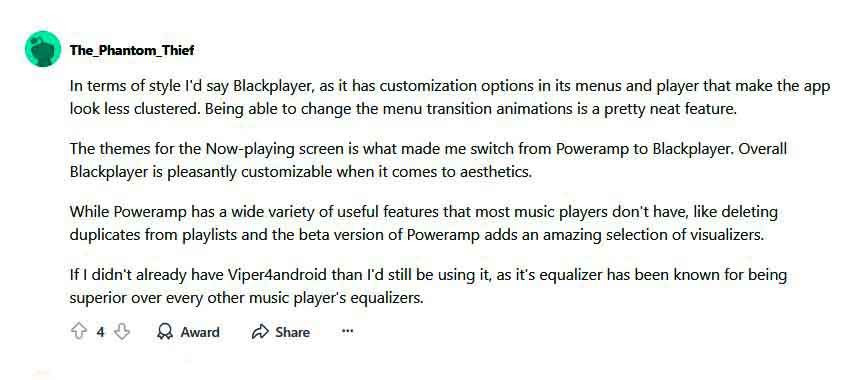
BlackPlayer adopts a clean, swipe-centered design with swipe-right menus for Library, Playlists, and Settings. You can rearrange pages, hide unwanted sections, and customize fonts and colors in seconds. Its uncluttered Now Playing screen keeps album art front and center, with intuitive gestures for skip, seek, and revealing lyrics.
Poweramp appeals to tinkerers: extensive skin support, customizable button layouts, artwork zoom, and separate lock-screen modes. The learning curve is steeper, but you can tailor nearly every pixel—from status bar color to widget transparency. For users new to Android music players, the sheer number of options can feel overwhelming; frequent visits to Settings are common.
BlackPlayer prioritizes speed and comfort, while Poweramp rewards patience with pixel-perfect control.
Performance & Battery 🔋
On a mid-range device (e.g., Snapdragon 7xx chipset), BlackPlayer ran for 10+ hours of FLAC playback with EQ off and <100 MB RAM usage. Drop EQ to zero and background scanning completes near instantly.
Poweramp, with its processing pipeline active, sustained around 7–8 hours on the same phone, dipping into 200 MB RAM during heavy EQ changes. Disabling DVC and high-res output extended battery life by 15%. Both apps support background play and wakelock settings; fine-tuning DSP flags can reclaim extra runtime.
For daily commuters using Bluetooth earphones, BlackPlayer’s low overhead is ideal. If precision audio tweaks are worth occasional extra charging, Poweramp still performs admirably on modern mid-range hardware.
Price & Value 💰
BlackPlayer’s free version is ad-supported but fully functional; users upgrading to EX (currently $3.29) gain advanced themes, fonts, widgets, and priority feature updates. That one-time purchase delivers sustained value for commuters and casual listeners.
Poweramp offers a 15-day trial unlocking every feature. Afterward, a $3.99 unlocker buys lifetime access to updates and DSP engines. At under $4, Poweramp delivers professional-grade audio tools and extensive codec support—an unbeatable ROI for serious audiophiles.
Both apps sit near the $3–4 sweet spot for Android audio, but your choice hinges on feature depth versus interface simplicity.
Support & Updates ⚙️
BlackPlayer receives frequent minor updates via Google Play, primarily bug fixes and design polish. The developer engages users on Reddit and GitHub, where you can submit feature requests and join betas.
Poweramp’s developer forum and subreddit are vibrant hubs for custom EQ sharing, skin creation, and troubleshooting. Major version updates appear every 6–9 months, adding built-in AutoEQ support, new DSP modules, and interface refinements. Community-driven plugin ecosystems (visualizers, DSP add-ons) keep Poweramp evolving well past most competitors.
More articles you may find useful



Strengths of BlackPlayer | why promote it?
🎨 Simplicity in design: minimal interface that’s instantly familiar—no manual required.
🔋 Battery frugality: lean CPU usage yields longer playtime on mid-range phones.
🎨 High customization: 11 color accents, multiple fonts, eight Now Playing themes available via EX.
🔄 Fast scanning: large libraries load in seconds, ideal for SD-card collections.
🎶 Gapless playback: flawless transitions on concept albums and live recordings.
🛠️ Tag editor & lyrics: edit metadata and view embedded or synced lyrics without leaving the app.
🤝 Active dev community: regular updates, beta channel access, GitHub issue tracking.
🏷️ Exceptional value: free core app, EX unlocker under $4 delivers premium features.
Strengths of Poweramp — for whom it’s ideal?
🎚️ Audiophiles & engineers: parametric EQ, AutoEQ, DVC, multiple dither options.
📀 Format collectors: support for APE, ALAC, WMA, Opus, DSD (DSF/DFF), and more.
🎨 UI tinkerers: themes engine, widget transparency, artwork zoom, customizable layouts.
🔊 Hi-Res enthusiasts: up to 384 kHz output, selectable resamplers (SWR/SoX), deep bass control.
📡 Connectivity buffs: full Android Auto and Chromecast integration for car and home streaming.
🔄 Advanced features: ReplayGain, crossfade, gapless smoothing, cue sheet parsing, dynamic queue.
💼 Professional use cases: podcast producers and DJs can tweak tempo, reverb, and stereo width in real time.
🔄 Lifetime updates: active forum, plugin ecosystem, and steady major releases.
Final Recommendation
If you want a plug-and-play player that sounds great, conserves battery, and looks slick without overwhelming options, go with BlackPlayer (free + EX unlock). It’s perfect for daily commuters, minimalists, and anyone who values speed and simplicity.
If you’re an audio aficionado who demands the broadest codec coverage, parametric EQ, and hi-res output, Poweramp is your destiny. Download the 15-day trial, import your favorite AutoEQ presets, and experience the ultimate Android audio sandbox.
Ready to get started?
- Click here to download BlackPlayer from Google Play.
- Try Poweramp’s full feature set with the free trial.
- Watch short setup video on YouTube for EQ tips.
- Sign up with your email in app for exclusive EQ presets and dark-mode skin packs.
5/5 - (9 votes)


BlackPlayer really shines if you’re into a clean, minimalist interface and light battery usage—swipe-based navigation, gapless playback, compact size (just ~8 MB free, ~12 MB EX) and a simple but solid 5-band EQ with BassBoost and virtualizer make it perfect for casual users or those with large offline libraries. Love the smooth UI!
So it really boils down to what matters most to you:
• Want lightweight, elegant, and easy? Go with BlackPlayer.
• Crave full control, audio precision, and advanced features? Poweramp is your go-to.
Well done on this write up it’s helped me (and probably others) a lot in deciding. Keep these comparisons coming! 😊🫠
Thank you for your feedback. 🙏