


Updated: 02 Aug 2026 | Author: Editorial Team Author Profile
Apple Music vs iTunes is the question millions still type into search bars and with good reason: one is the streaming future, the other is the legacy of owning music. Is Apple Music the same as iTunes? Not exactly. What’s the difference between Apple Music and iTunes? This guide answers that (step-by-step), shows how to move your library, fixes sync headaches, and helps you choose between subscriptions, iTunes Match and buying songs updated with the facts Apple publishes and recent changes through 2026.
Table of Contents
- 1. Quick snapshot: the bottom line
- 2. What Apple Music is and what iTunes used to be?
- 3. Can I still buy music on iTunes in 2026?
- 4. Apple Music vs iTunes Match: which should I choose?
- 5. How to transfer iTunes library to Apple Music step-by-step
- 5.1. Quick checklist (before you start)
- 5.2. Step-by-step on Mac (modern macOS)
- 5.3. How to transfer iTunes library to Apple Music on Windows
- 5.4. If automatic matching misses tracks
- 5.5. More articles you may find useful
- 5.6. BlackPlayer Failed to Load Track Error in 2026 | How to Fix?
- 5.7. How to Load Music to iPhone without Apple Music 2026 Guide
- 5.8. How to Fix BlackPlayer Not Detecting Music Full Guide (2026)
- 6. Apple Music subscription cost vs buying songs on iTunes
- 7. Decision checklist (one-page quick guide)
- 8. Conclusion
Quick snapshot: the bottom line
Apple Music = streaming catalog + personal library sync, subscription-based, DRM on streamed tracks.
iTunes / iTunes Store = the retail store and the old app (buy to own, DRM-free for older purchases), and a Windows legacy app for audiobooks/podcasts in some setups.
iTunes Match = a paid service that uploads/matches your owned tracks to iCloud so you can keep DRM-free copies while accessing them anywhere.
What Apple Music is and what iTunes used to be?
Apple Music: streaming, curated, social
Apple Music is Apple’s streaming service offering tens of millions of tracks for on-demand playback, curated playlists, live radio, and library syncing across devices while you subscribe. Streams and “downloads” from Apple Music are tied to your subscription (they rely on DRM for licensed tracks).
iTunes: app vs store vs concept
“iTunes” has historically meant three related things: the iTunes app (a media manager on older macOS/Windows), the iTunes Store (the retail marketplace where you could buy and permanently own tracks/albums), and the concept of locally owned music files. Over time Apple split the app into separate Music, TV, and Podcasts apps on macOS; on Windows the iTunes app still exists for some media but Apple has been shifting features to dedicated apps.
Can I still buy music on iTunes in 2026?
Yes, you can still buy music on iTunes in 2026. Despite the massive shift toward streaming platforms like Apple Music, Apple has kept its digital download storefront open for users who prefer to own their music files outright rather than renting them through a subscription.
Here is how you can currently purchase music across different devices:
iOS and iPadOS: You can buy tracks and albums directly through the dedicated iTunes Store app.
macOS and Windows: The storefront is integrated into the Apple Music app. You can enable the iTunes Store in the app’s settings to purchase and download music.
Many audiophiles and “superfans” continue to buy DRM-free digital tracks to guarantee permanent offline access to their personal archives and to provide better financial support to artists compared to standard streaming payouts.
For more details on how digital purchases work within Apple’s current ecosystem, you can check out Apple’s official guide on buying music from the iTunes Store.
Apple Music vs iTunes Match: which should I choose?
What iTunes Match does
iTunes Match (annual fee) scans your music library and matches or uploads tracks to iCloud, letting you access and re-download your owned music anywhere often in higher bitrates, even after you stop using the physical files locally. It’s aimed at owning your music in the cloud without DRM
Apple Music vs iTunes Match: decision rule
Choose iTunes Match if you primarily want to own and preserve access to personal/uploaded files (and want DRM-free re-downloads).
Choose Apple Music if you want unlimited streaming, curated playlists, and social/algorithmic discovery, and you’re okay with subscription-tied access.
Many power users keep both: Apple Music for streaming and iTunes Match for a permanent copy/backups.
How to transfer iTunes library to Apple Music step-by-step
Quick checklist (before you start)
Backup your iTunes folder (Go to the iTunes app
 on your PC. Choose Edit > Preferences, click Advanced, then in the “iTunes Media folder location” section, note the location of your iTunes Media folder.)
 Update macOS/Windows apps (Music or iTunes) to latest supported version.
Sign in with same Apple ID on all devices.
Note non-DRM files and special formats (AIFF, WAV, FLAC needs conversion).
 on your PC.

Step-by-step on Mac (modern macOS)
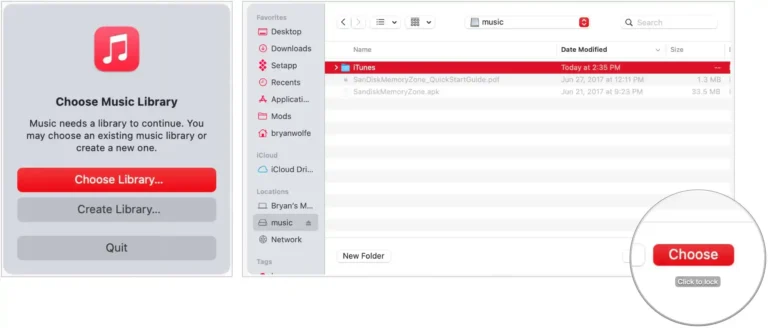
Quit Music. Hold Option while launching Music and choose “Choose Library”.
Select your old iTunes Library.itl or the folder with the media. The Music app will import and convert the database.
Enable Sync Library (Settings > Music) to upload/match to iCloud Music Library.
How to transfer iTunes library to Apple Music on Windows
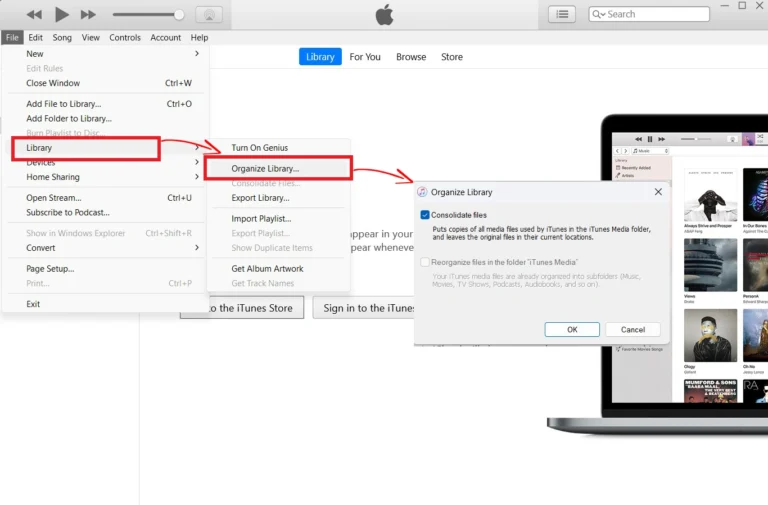
In iTunes, confirm iTunes Media folder location (Edit > Preferences > Advanced).
Consolidate files (File > Library > Organize Library > Consolidate files).
Install Apple Music (if available) or keep using iTunes; you can import the library into Apple Music app on devices or use iCloud Music Library to sync.
If automatic matching misses tracks
Manually upload the missing files via the Music app on macOS (File > Import), or use iTunes Match to upload unmatched tracks. Use third-party tools (SongShift, TuneMyMusic) for playlist transfer when native tools can’t.
More articles you may find useful



Apple Music subscription cost vs buying songs on iTunes
| Option | Monthly / One-Time Cost (U.S.) | Access Type | Main Benefits |
|---|---|---|---|
| Apple Music – Individual | $11.99 / month | Subscription; full streaming access | 100 M+ songs, offline playback, lossless quality, ad-free |
| Apple Music – Family (up to 6 users) | $19.99 / month | Shared subscription for up to six people | Each member has their own library and recommendations |
| Apple Music – Student | $6.99 / month | Discounted plan for verified students | All premium features at a lower cost |
| Buy Songs on iTunes | $0.99 – $1.29 per song | One-time purchase; permanent ownership | DRM-free files, lifetime playback, no monthly fees |
| iTunes Match (optional add-on) | $24.99 / year | Cloud matching & backup for owned music | Upload & stream your personal library in high quality |
Decision checklist (one-page quick guide)
- If you mostly stream: Choose Apple Music.
- If you mostly own files and want backups: Choose iTunes Match (+ keep purchases).
- If you want both flexibility and ownership: Use Apple Music + iTunes Match together.
- If you only buy occasionally: Buy on the iTunes Store; keep a local backup.
- If you’re migrating now: Backup → Consolidate → Import → Enable Sync Library → Verify.
Conclusion
In conclusion, Apple Music vs iTunes is more than just a comparison between streaming and downloading it’s about how you prefer to enjoy your music in 2026. Apple Music wins for most users with its unlimited streaming, offline playback, and smart curation that keeps your library fresh and dynamic. iTunes, however, still holds value for those who want permanent ownership and a personal digital archive. The best approach? Stream daily with Apple Music, and keep iTunes for your timeless favorites. Ultimately, Apple Music vs iTunes reflects a choice between freedom of access and pride of ownership.
5/5 - (5 votes)


The problem with iTunes Match is simply that it doesn’t match. Example: ‘Exile On Main Street’. Ripped the CD. On my computer for years. Upload it to iTM. It gives me back 17 songs. There should be 18. The explanation given to me was Promotone (or whoever held the rights) had decided not to release one of the songs. My question was why use Match, if it’s not going to match? And the biggest question of all. AppleMusic? Every time I hear it mentioned I wonder if I’m hearing correctly. Pay them a subscription? So I can listen to my own music? Am I understanding that correctly?
That’s a fair point.
iTunes Match has never been perfect because it sometimes replaces your uploaded tracks with Apple’s catalog versions, which can differ due to licensing or regional availability. If preserving your exact CD rip matters, it’s usually better to keep a local backup and avoid relying solely on matched versions. Also, Apple Music isn’t required to play your local files, but a subscription is needed if you want cloud syncing through Apple’s service.
Great breakdown of the differences between Apple Music and iTunes! It’s helpful to see how each service has evolved and what they offer in 2026. I appreciate the tips for users trying to decide which one best suits their needs!
Thanks! Glad you found it helpful. Apple Music and iTunes can definitely be confusing in 2026, so hopefully this makes it easier to figure out which one fits your needs best!